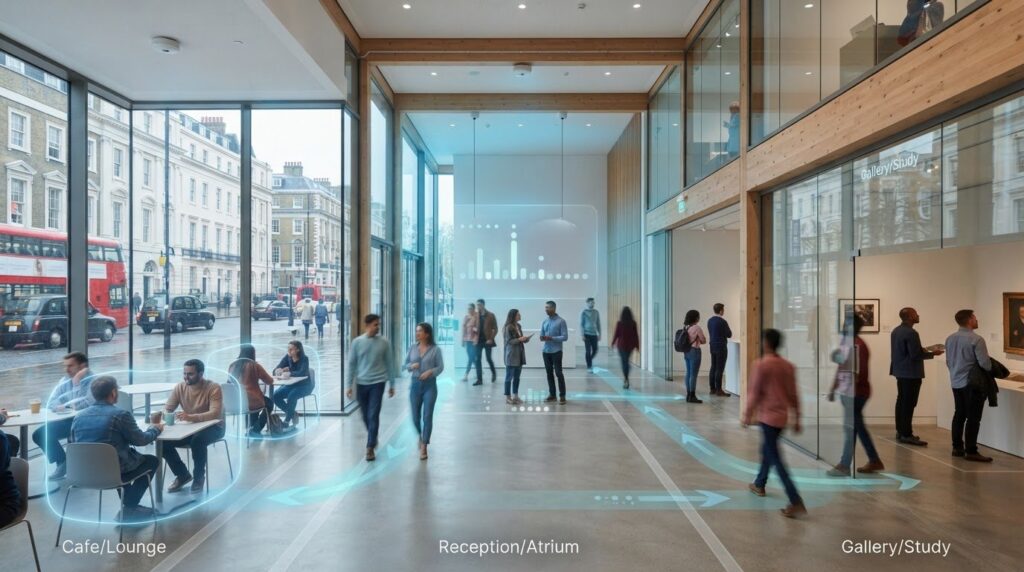
What does a live count actually tell you: how many people are in a space now, or how many have passed through it? That distinction matters. Real time occupancy monitoring estimates the number of people present in a defined area at a given moment, whilst footfall data typically records movement or entries over a period. Neither figure is useful in isolation. Layout, movement patterns and the way a system counts all affect what the data means.
It’s reasonable to ask how sensors produce a live count, how reliable that count is and whether monitoring puts visitor privacy at risk. The answers depend on the sensing approach, configuration and how data is handled. This article explains how occupancy information is collected, what it can and can’t tell you, and how it differs from visitor counts. You’ll also learn what to consider when choosing sensors for a building or public space, and how to turn current occupancy into practical decisions about space and operations whilst keeping privacy in view.
Key Takeaways
- Learn why current occupancy and footfall counts answer different questions, and choose the measure that fits your decision.
- See how real time occupancy monitoring turns sensor input into an area-level estimate, with reporting dependent on the system and its configuration.
- Assess your space, monitoring objective and privacy needs before choosing a sensing approach.
- Use a clear occupancy definition, zone boundary and reporting interval to shape a practical deployment plan.
- Explore how AI 3DPro2 and V9 Analytics Software may fit your occupancy question. Contact Smart Urban Sensing Ltd or email sales@smarturbansensing.co.uk.
Real-time occupancy vs footfall: what’s the difference?
Occupancy is a snapshot; footfall measures visits or movement over time. Real time occupancy monitoring estimates how many people are in a defined space at a given moment. Footfall commonly counts entries, visits or crossings over a chosen period. The measures can complement one another, but they answer different operational questions.
What does an occupancy count actually measure?
A count only has meaning once the monitored area and its boundaries are clear. It might cover an entire venue, one room, a queue or a particular event zone. Decide who or what the system should include, and how it should register movement into and out of that area.
As people enter, leave or move between monitored zones, the estimate may change. Sensor placement and coverage matter: a doorway or boundary that isn’t adequately covered can affect what the system records. Different occupancy sensor technologies detect presence or movement in different ways, so match the method and configuration to the space and the question being asked.
A count is not a description of the people in a space. On its own, it doesn’t reveal anyone’s identity, intent or individual behaviour. It’s an area-level estimate, and its limits should be understood before using it to inform operational or event decisions.
How is occupancy different from footfall?
Imagine a museum gallery that welcomes visitors throughout the day. An occupancy count indicates how many people are in the gallery at a particular time. Footfall can show how many people entered across the day, including visitors who have since left. For understanding cumulative visits, museum footfall analytics may be more relevant. For seeing how busy the gallery is now, occupancy is the more direct measure.
The distinction matters at events, too. A rising entry count doesn’t necessarily mean the same number of people are currently inside: some may have left or moved into another zone. Conversely, a steady occupancy count could coexist with frequent arrivals and departures. Use the metric that matches the decision, whether you need to understand current crowd levels or review how many people passed through an entrance over time.
Before interpreting either figure, confirm the area being counted, which boundary crossings are included and how movement between zones is handled. Clear definitions make comparisons more meaningful and help teams avoid treating cumulative visits as a live headcount. To discuss people-counting options for your space, contact Smart Urban Sensing Ltd or email sales@smarturbansensing.co.uk.
How real-time occupancy monitoring turns sensor input into a live estimate
A sensor doesn’t simply produce a definitive headcount. It detects signals associated with presence or movement, and a configured system interprets those detections to estimate how many people are in a defined area. The method, processing and reporting depend on the equipment, its placement and the counting rules set for the space.
In brief: sensors detect presence or movement, configured rules turn those detections into a zone-level estimate, and analytics make the resulting data available for review. That describes the general principle, not a guarantee of identical performance across systems. For real time occupancy monitoring, confirm what “real time” means in practice, including how data is transmitted and how often a dashboard refreshes. Don’t assume alerts or a particular update interval unless you’ve checked the system’s capabilities.
What roles can cameras and non-camera sensors play?
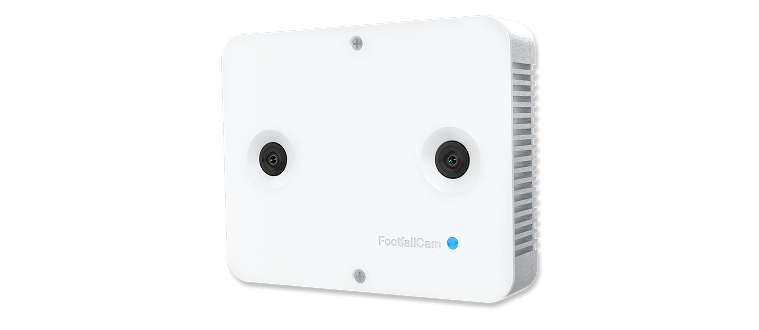
Different sensors detect people in different ways. Stereoscopic sensing uses depth information from two viewpoints to help detect movement or presence. Thermal sensing registers heat patterns, whilst infrared approaches use infrared signals to detect presence or movement. These methods can support occupancy estimates without relying on the same kind of visual input, but the sensing method alone doesn’t determine suitability or privacy implications.
Smart Urban Sensing Ltd offers 3D stereoscopic, thermal and infrared sensing options. The right approach depends on the environment and monitoring brief, including the layout, coverage required and conditions at the site. A method that suits one entrance or indoor area may not suit a different zone or outdoor setting. Assess sensor choice and positioning for the specific space rather than selecting by category alone.
From detected movement to a usable occupancy view
Once installed and configured, a system can associate detections with a defined zone. Depending on its rules, it may register movement across a boundary as an entry or exit and use those events to update the area’s estimated count. The boundary, direction of travel and treatment of movement between zones all influence the resulting figure. If a boundary is missed or the configuration doesn’t reflect how people move, the count may not represent the space as intended.
Analytics can help teams review occupancy information alongside other relevant data. Smart Urban Sensing Ltd offers V9 Analytics Software for data-driven insights. Before relying on its output as live operational information, confirm the reporting, refresh and alert functions available for the selected setup. A count is most useful when it answers a defined question and its limitations are understood.
To discuss a suitable sensing and analytics approach for your space, contact Smart Urban Sensing Ltd or email sales@smarturbansensing.co.uk.
Which monitoring approach suits your space, and what about privacy?
The right approach depends on what you need to know and the conditions in which a sensor must operate. A venue entrance, a transport hub and an open outdoor area have different boundaries, movement patterns and environmental factors. For real time occupancy monitoring, start with the decision the count needs to support, then assess sensor coverage and placement against the space.
How to match the monitoring approach to the environment
In retail, define whether you need a count at an entrance, within a department or across a wider area. Check that sensor placement captures the relevant movement and that the monitored zone matches the operational question. If you need to compare areas, make sure the zones are defined consistently before reviewing their counts.
Transport settings call for a clear distinction between counting people in a vehicle, monitoring a particular area of a hub, or counting general visits. These are not interchangeable measures, so define the population and boundaries before selecting equipment. For outdoor spaces, discuss coverage and environmental suitability with the supplier. Lighting, weather exposure, mounting position and the openness of the area may all affect which configuration is appropriate. Verify product-specific limits for the intended site rather than assuming a sensor will perform identically in every setting.
Can occupancy be monitored without identifying individuals?
An occupancy count doesn’t inherently require a person’s identity. Some systems can estimate numbers from detected presence or movement, rather than identifying individuals or retaining identifiable imagery. However, privacy depends on what a particular system collects, how it processes that information and whether anything is stored. Don’t assume every camera-based system behaves the same way, or that a sensor type alone settles privacy questions.
A privacy-by-design approach means examining those choices before deployment. Clarify what data is collected, how long it is retained, who can access it and what safeguards apply. Also establish who is responsible for assessing compliance in the specific context. These checks matter particularly where monitoring takes place at events or in workplaces, where people should understand the purpose of the system and how information is handled.
Smart Urban Sensing describes its approach as privacy-first and GDPR-compliant. Treat this as a starting point for a deployment discussion, not a substitute for checking the system configuration and responsibilities that apply to your use case. If you’re comparing a GDPR compliant people counter, ask the supplier for clear information about data handling, access controls and retention, and confirm how these align with your organisation’s requirements.
For guidance on sensing options for your environment, contact Smart Urban Sensing or email sales@smarturbansensing.co.uk.

How to plan a real-time occupancy monitoring deployment
A useful deployment starts with an operational decision, not a sensor catalogue. Before selecting equipment, decide what “occupied” means for your space, draw the zone boundary and agree how often you need the count reported. These choices give the supplier a clear brief and make it easier to assess whether the resulting data will be useful.
Define the question before choosing a sensor
Be precise about the measure you need: people currently in a space, entries through an entrance, or movement between zones. Record who will use the information and what action it should inform. For an event, that could mean understanding occupancy in a particular area rather than simply adding up arrivals at the venue.
Also note practical constraints, such as layout, mounting options, lighting and environmental exposure. Confirm these with a solution provider, since the appropriate sensor and configuration depend on the site.
A practical deployment workflow
- 1. Define the decision. Identify the operational question the count must answer and who needs to act on it.
- 2. Set the counting rules. Specify who is included, the monitored zone’s boundaries and how entries, exits or movement between zones should be treated.
- 3. Agree the reporting interval. Decide how frequently information needs to be available for its intended use. Ask the provider to confirm data transmission, refresh and any alerting capabilities rather than assuming these from the term “real time”.
- 4. Select and install the system. Match the proposed sensor and placement to the brief and site conditions. Plan installation so the intended zone and its entry points are covered.
- 5. Commission and review. Agree how the count will be checked against observed conditions during commissioning. Establish who will review it and what to investigate if the count appears inconsistent with activity on site.
Validate the count and establish a review routine
Commissioning should confirm that the configured boundaries and counting rules reflect how people actually use the space. Check the count against observed conditions, including different levels of activity, and record any discrepancies to investigate. If the layout, entrances or operating pattern changes, revisit coverage and configuration. A count that suited the original setup may no longer represent the area as intended. Include data quality in routine reviews, and clarify who is responsible for following up on discrepancies. This helps keep real time occupancy monitoring aligned with operational needs without assuming a particular accuracy level or performance result.
For a deployment discussion based on your space and requirements, contact Smart Urban Sensing or email sales@smarturbansensing.co.uk.
How Smart Urban Sensing connects occupancy monitoring with useful analytics
Monitoring equipment is most valuable when it answers a clearly defined question. Smart Urban Sensing offers people-counting solutions, including AI 3DPro2 and V9 Analytics Software. The relevant combination depends on the space, the zones you want to understand and how the resulting information will support a decision. For example, a venue seeking an estimate of people in a specific area needs to define that area and its counting rules before selecting equipment or interpreting analytics.
What should you clarify before discussing a solution?
Prepare a concise brief so the proposed approach can be assessed against your actual requirements. Include:
- Space and zones: Describe the setting and mark the areas or boundaries to be monitored.
- Purpose: State what decision the count should inform and who will use the information.
- Reporting needs: Explain the level of detail and reporting interval required, then ask what the proposed system can provide.
- Site conditions: Note relevant environmental factors and ask which sensor options and configurations are suitable.
- Data and analytics: Confirm what information is processed or retained, who can access it, and which analytics and reporting functions are included. Check any live refresh or alert requirements directly rather than assuming they are available.
This also helps keep performance claims in context. Smart Urban Sensing states that its systems can achieve accuracy of up to 99.9%, but that figure should not be treated as a prediction for every product, site or measurement. Ask which equipment, conditions and counting method the claim applies to, and how performance would be assessed for your intended use.
Where can occupancy insights support wider planning?
Smart Urban Sensing’s people-counting and analytics solutions are relevant to retail, transport and smart-city applications. Depending on the question, teams may be interested in activity within a defined area, passenger counts or movement through outdoor spaces. For outdoor movement planning, smart city footfall monitoring is a related topic. The measure and monitored boundaries should still be defined to suit the decision being made.
Keep the connection between sensor choice and analytics practical: identify the measure first, then confirm how the proposed equipment and V9 Analytics Software can support its review. Discuss the reporting detail and data handling required for your deployment before relying on any output as operational information.
Discuss your monitoring requirements with Smart Urban Sensing, or email sales@smarturbansensing.co.uk.
Make occupancy data useful for your next decision
Real time occupancy monitoring is most valuable when a count is clearly defined, suited to the space and connected to a practical decision. Occupancy shows how many people are estimated to be present in a zone, whilst footfall records visits or movement over time. Keep those measures distinct, and review how sensor placement, configuration and reporting affect the information you use.
Privacy and operational needs belong in the planning from the outset. Confirm what the system measures, how information is handled and what reporting capabilities are available for your chosen setup. Smart Urban Sensing provides people-counting solutions for retail, transport and outdoor monitoring applications, with 3D stereoscopic, thermal and infrared sensor options. Its V9 Analytics Software supports data-driven insights, with suitability depending on your requirements and configuration.
Start with your space, zones and intended decisions. Discuss your occupancy monitoring requirements with Smart Urban Sensing, or email sales@smarturbansensing.co.uk. A well-defined question is a strong first step towards more informed decisions.
Frequently Asked Questions
What is real-time occupancy monitoring?
Real time occupancy monitoring estimates how many people are present in a defined space at a particular point in time. Sensors detect people or movement, and configured counting rules help turn those detections into an estimate for review. The update interval, coverage and accuracy depend on the equipment and deployment. Before relying on a count for an operational decision, confirm how often it updates and what area it covers.
How does real-time occupancy monitoring work?
Sensors detect people or movement within a configured area, and a system processes those detections into an occupancy estimate. Analytics software may then present the resulting data for review. The sensing method, processing and reporting features vary by solution. Ask the supplier how the proposed setup defines zones, handles data and provides updates, including what “real time” means for transmission and reporting in that configuration.
What is the difference between occupancy and footfall?
Occupancy estimates how many people are present in a space at a particular time. Footfall usually counts visits, entries or crossings over a period. For example, a venue’s daily entry total indicates how many visits occurred, whilst an occupancy count estimates how many people are inside at a given moment. The figures complement one another, but they answer different questions and shouldn’t be treated as interchangeable.
Can occupancy be monitored without identifying people?
Yes, monitoring can be designed to produce area-level counts without identifying individuals, but systems don’t all handle information in the same way. Ask what the sensors detect, whether imagery or other personal data is processed or retained, who can access it and for how long. Before deployment, review the proposed configuration and clarify your organisation’s responsibilities for data handling and relevant compliance.
How accurate is real-time occupancy monitoring?
Accuracy depends on the sensor, installation, space layout, configuration and operating conditions. Smart Urban Sensing states that its systems can deliver up to 99.9% accuracy, but this shouldn’t be taken as a result for every product or site. Ask which product, conditions and measurement method the figure applies to, how the proposed count will be checked during commissioning, and how changes in performance will be reviewed.
Where can real-time occupancy monitoring be used?
It can support monitoring in retail spaces, transport environments and outdoor areas, provided the system suits the site and the question being asked. Start by defining the zones to cover and how the data will inform a decision. Then confirm suitable sensor options, analytics capabilities and data handling with a provider. Smart Urban Sensing offers people-counting solutions for these application areas.
Does real-time occupancy monitoring show where people are going?
A basic occupancy count estimates how many people are in a defined area; it doesn’t necessarily show movement between zones or explain individual behaviour. More detailed movement analysis depends on the sensor arrangement, system and configuration. Before choosing a solution, specify whether you need a current count, entry data or movement between areas. Discuss your monitoring requirements or email sales@smarturbansensing.co.uk.
Retail and shopping centres
Find out what your entrance data should be telling you
In 20 minutes we review your entrances, current counting setup and conversion questions, then tell you what accurate footfall data would change. No obligation, no hard sell.